cloffice

Cloffice
Claude Code가 일하는 모습을 3D 사무실로 보여 주는 macOS 앱
A 3D office monitor for Claude Code sessions on macOS
최신 버전 다운로드 · Download the latest version
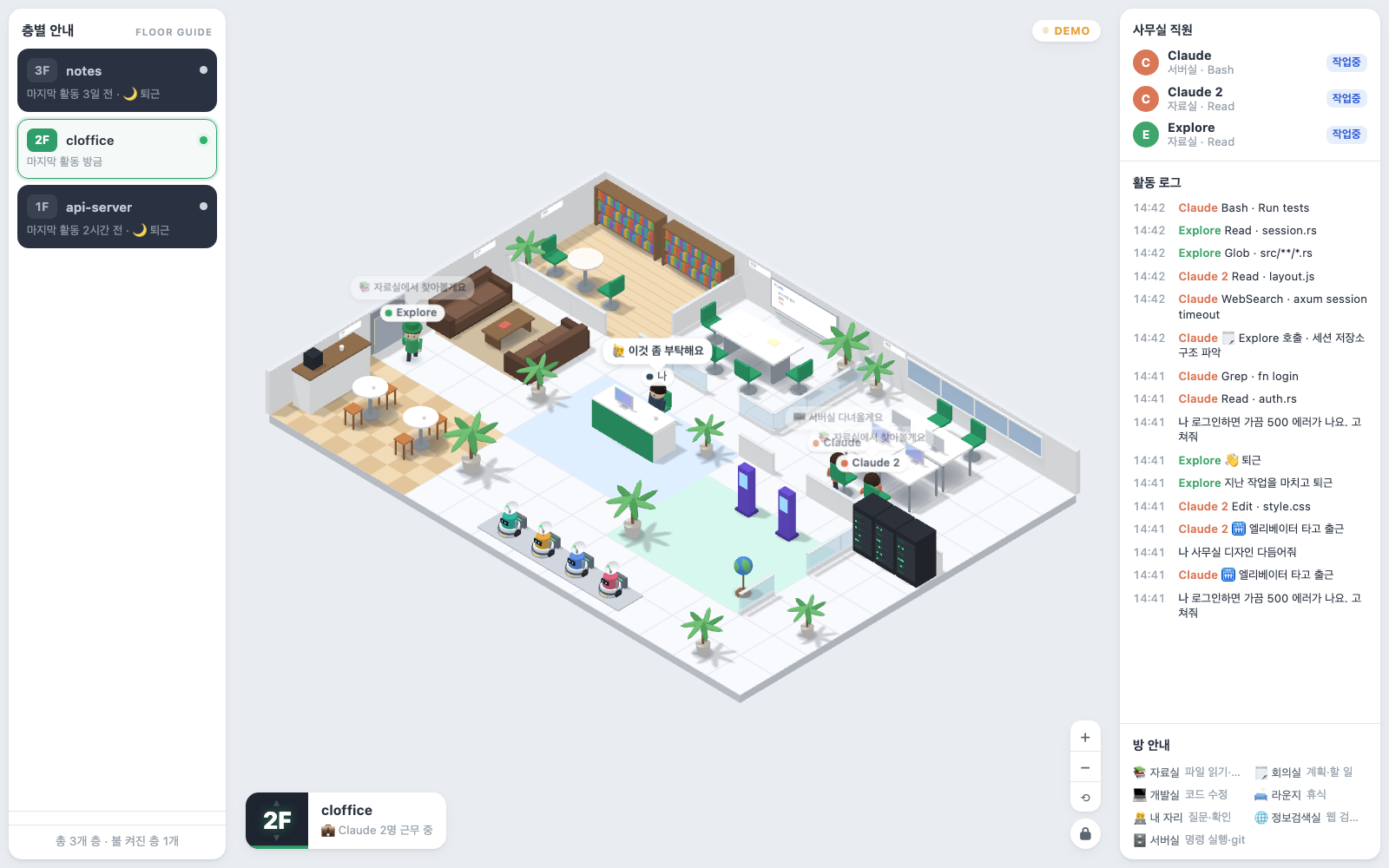
데모 데이터로 찍은 화면입니다. · Screenshot taken with demo data.
Claude Code를 쓰는 프로젝트마다 층이 생기고, 그 안에서 Claude와 서브에이전트가 방을 오가며 일합니다. 터미널 로그를 따라가지 않아도 지금 어떤 세션이 파일을 읽는지, 코드를 고치는지, 명령을 실행하는지 한눈에 보입니다.
Each project you use with Claude Code becomes a floor, and Claude and its subagents walk between rooms as they work. Without following the terminal, you can see at a glance which session is reading files, editing code or running commands. The interface is in Korean.
[!NOTE] 진행 상황을 참고하는 용도로만 써 주세요. Cloffice는 Claude Code가 남기는 세션 로그를 읽어 화면을 그립니다. 이 로그 형식은 공개된 규격이 아니라서 Claude Code가 업데이트되면 바뀔 수 있고, 그러면 캐릭터가 엉뚱한 방에 가거나 일부 활동이 보이지 않을 수 있습니다. 바뀐 형식은 Cloffice 업데이트로 맞춰 나가겠습니다. 작업 결과는 꼭 Claude Code에서 직접 확인하세요.
Use it only as a reference for how work is going. Cloffice draws its screen from the session logs Claude Code writes. That log format is not a published spec and may change when Claude Code updates. If it does, characters may go to the wrong room or some activity may not show up until a Cloffice update catches up. Always check the actual results in Claude Code itself.
이름의 뜻 · The name
Cloffice는 Closet(옷장)과 cLaude cOde oFFICE(Claude Code 사무실)를 합친 이름입니다. 옷장 하나를 비워 꾸민 작은 사무실이라는 뜻입니다. 책상은 넷뿐이고 방도 작지만, 자료실부터 서버실과 회의실까지 일에 필요한 방은 다 갖췄습니다. 그 안에서 Claude와 서브에이전트가 오가며 일합니다.
Cloffice = Closet + cLaude cOde oFFICE: a small office built inside a closet. It has only four desks, yet every room the work needs, from the library to the server room and the meeting room, where Claude Code and its subagents go about their work.
주요 기능 · Features
- 프로젝트별 층: 최근 7일 안에 쓴 프로젝트가 층으로 나타나고, 쓰지 않는 층은 목록에서 지울 수 있습니다. Floors per project: projects used in the last 7 days appear as floors, and you can remove the ones you no longer use.
- Cowork 층: Claude 데스크탑 앱의 Cowork 세션은 맨 위의 층 하나에 모입니다. Cowork floor: Cowork sessions from the Claude desktop app gather on one floor at the top.
- 세션과 서브에이전트: 세션마다 Claude 한 명이 일하고, 서브에이전트도 직원으로 나타납니다. Sessions and subagents: each session is one Claude at work, and subagents show up as staff too.
- 도구별 방: 파일 읽기는 자료실, 코드 수정은 개발실, 명령 실행은 서버실, 웹 검색은 정보검색실에서 합니다. A room per tool: reading files happens in the library, editing code in the dev room, commands in the server room, web search in the research room.
- 활동 로그: 누가 무엇을 했는지 시간순으로 보여 줍니다. Activity log: who did what, in order.
- 자동 업데이트: 새 버전이 나오면 버튼 하나로 업데이트합니다. Auto update: one button installs a new version.
필요한 것 · Requirements
- macOS 13 이상 (Apple Silicon, Intel) macOS 13 or later (Apple Silicon or Intel)
- Claude Code: 최근 7일 안에 쓴 프로젝트가 층으로 나타납니다. Claude Code: projects used in the last 7 days appear as floors.
다운로드와 설치 · Download and install
- Release 페이지에서
Cloffice_<버전>_universal.dmg를 받습니다. Apple의 공증을 받은 앱입니다. DownloadCloffice_<version>_universal.dmgfrom the Releases page. The app is notarized by Apple. - 받은 DMG를 열고
Cloffice를Applications폴더로 끌어다 놓습니다. Open the DMG and dragClofficeinto theApplicationsfolder. - 응용 프로그램에서 Cloffice를 엽니다. Open Cloffice from Applications.
Claude 폴더 · The Claude folder
Cloffice는 Claude Code를 처음 설치했을 때의 기본 폴더 ~/.claude에서 가장 잘 작동합니다. 이 폴더는 스스로 찾으니 따로 설정할 것이 없습니다. CLAUDE_CONFIG_DIR로 다른 폴더를 쓰고 있거나 폴더를 찾지 못했다면, 왼쪽 층 목록의 폴더 선택(층이 있을 때는 목록 아래 바꾸기)으로 직접 고르세요.
Cloffice works best with ~/.claude, the default folder Claude Code creates on install. It finds that folder on its own, so there is nothing to set up. If you use another folder through CLAUDE_CONFIG_DIR, or the folder isn’t found, pick it with 폴더 선택 (Choose folder) in the floor list on the left, or 바꾸기 (Change) below the list once floors appear.
업데이트 · Updates
새 버전이 나오면 오른쪽 위에 업데이트 버튼이 나타납니다. 누르면 새 버전을 받아 서명과 공증을 확인한 뒤 앱을 다시 엽니다.
When a new version is out, an update button appears at the top right. Click it, and Cloffice downloads the new version, checks its signature and notarization, then reopens.
읽는 데이터와 네트워크 · Data and network
- Claude Code 세션 기록(
~/.claude/projects)과 Claude 데스크탑 앱의 Cowork 세션 기록을 읽기만 합니다. 고치지 않습니다. Cloffice only reads Claude Code session logs (~/.claude/projects) and the Cowork session logs of the Claude desktop app. It never changes them. - 네트워크는 업데이트를 확인하고 받을 때만 씁니다. 이때 GitHub에 다운로드 요청만 보내고, Claude Code 기록은 어디로도 보내지 않습니다. It uses the network only to check for and download updates. It sends GitHub nothing but the download request, and your Claude Code logs never leave your Mac.
안내 · Notice
Cloffice는 개인 프로젝트이며 Anthropic의 공식 제품이 아닙니다. 이 저장소는 배포 전용이라 소스 코드는 없습니다.
Cloffice is a personal project, not an official Anthropic product. This repository is for releases only and holds no source code.